
This is the print version of this page. All content is copyright Indezine.com 2000-2026.
Definitions and resources for terms and techniques used in the world of presentations
See Also:
PowerPoint and Presenting Notes
PowerPoint and Presenting Glossary
Presentations Glossary in alphabetical order:
A |
B |
C |
D |
E |
F |
G |
H |
I |
J |
K |
L |
M |
N |
O |
P |
Q |
R |
S |
T |
U |
V |
W |
X |
Y |
Z

Gabe Anderson takes care of support and community initiatives at Articulate, a provider of rich media products used for e-learning.
Here’s a list of links on Indezine.com where he has been featured:
 Articulate Presenter ’09: The Indezine Review
October 15, 2008
 Articulate Video Encoder ’09: The Indezine Review
October 14, 2008
 Articulate Engage ’09: The Indezine Review
October 8, 2008
 Articulate Quizmaker ’09: The Indezine Review
October 8, 2008
 Articulate Quizmaker: Conversation with Gabe Anderson
February 14, 2008
Articulate Online: Conversation with Gabe Anderson
May 12, 2007
Articulate: Conversation with Gabe Anderson
December 21, 2006
 Word of Mouth – The Articulate Blog
June 11, 2004
Filed Under:
G
Tagged as: Articulate, Gabe Anderson, Personality
Comments Off on Gabe Anderson
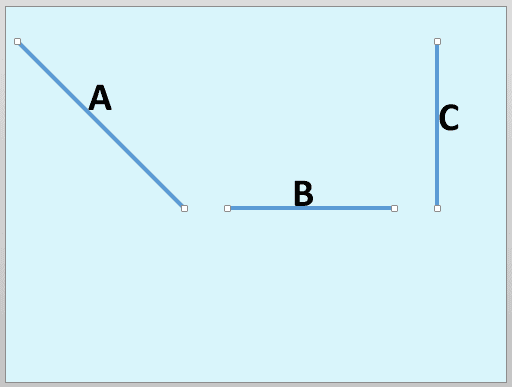
In PowerPoint for Windows, you rotate shapes using the white rotation handle that appears when you select a shape. However, have you ever noticed that the open line shape in PowerPoint doesn’t show a white rotation handle?
To learn more, choose your version of PowerPoint. If we do not have a tutorial for your version of PowerPoint, explore the version closest to the one you use.
Change a Diagonal Line to a Horizontal or Vertical Line in PowerPoint 365
Change a Diagonal Line to a Horizontal or Vertical Line in PowerPoint 2013
Change a Diagonal Line to a Horizontal or Vertical Line in PowerPoint 365
Change a Diagonal Line to a Horizontal or Vertical Line in PowerPoint 2011
Change a Diagonal Line to a Horizontal or Vertical Line in PowerPoint for the Web
Tutorial Code: 06 02 04
Previous: 06 02 03 Format Painter in PowerPoint
Next: 06 02 05 Finding Length of a Diagonal Line in PowerPoint
Filed Under:
A
Tagged as: 06-02, Advanced Shape Techniques, PowerPoint Tutorials, Shapes
Comments Off on Advanced Shape Techniques: Change a Diagonal Line to a Horizontal or Vertical Line in PowerPoint
Rotating slide objects in PowerPoint can be necessary, and beyond the Rotation handle you see when you select most objects, you will find many more options to rotate, sometimes when you least expect to be able to rotate! In this tutorial, we will take rotation for a spin literally, and find some fun options.
To learn more, choose your version of PowerPoint. If we do not have a tutorial for your version of PowerPoint, explore the version closest to the one you use.

Tutorial Code: 06 01 07
Previous: 06 01 06 Shift Key Fun
Next: 06 02 01 Change One Shape to Another in PowerPoint
Filed Under:
B
Tagged as: 06-01, Basics About Shapes, PowerPoint Tutorials, Shapes
Comments Off on Basics About Shapes: Rotation Fun in PowerPoint
PowerPoint provides several ways to arrange, position, or resize your slide objects; and the way these work can either save you hours of work or provide you with enough time to waste. It all depends on how you work with these tricks!
To learn more, choose your version of PowerPoint. If we do not have a tutorial for your version of PowerPoint, explore the version closest to the one you use.

Tutorial Code: 06 01 06
Previous: 06 01 05 Flip Shapes in PowerPoint
Next: 06 01 07 Rotation Fun in PowerPoint
Filed Under:
B
Tagged as: 06-01, Basics About Shapes, PowerPoint Tutorials, Shapes
Comments Off on Basics About Shapes: Shift Key Fun in PowerPoint
In a PowerPoint column chart, axes are typically positioned on the left and bottom sides of the plot area. However, there may be scenarios where your chart axes cross each other within the plot area rather than be located on its edges.
To learn more, choose your version of PowerPoint. If we do not have a tutorial for your version of PowerPoint, explore the version closest to the one you use.
Crossed Axes for Charts in PowerPoint 2013
Crossed Axes for Charts in PowerPoint 2011

Tutorial Code: 10 08 09
Previous: 10 08 08 Add Secondary Value Axis to Charts in PowerPoint
Next: 10 09 01 Chart Legend in PowerPoint
Filed Under:
C
Tagged as: 10-08, Chart Axes, Charts and Graphs, PowerPoint Tutorials
Comments Off on Chart Axes: Crossed Axes for Charts in PowerPoint
Microsoft and the Office logo are trademarks or registered trademarks of Microsoft Corporation in the United States and/or other countries.