
This is the print version of this page. All content is copyright Indezine.com 2000-2026.
Definitions and resources for terms and techniques used in the world of presentations
See Also:
PowerPoint and Presenting Notes
PowerPoint and Presenting Glossary
Presentations Glossary in alphabetical order:
A |
B |
C |
D |
E |
F |
G |
H |
I |
J |
K |
L |
M |
N |
O |
P |
Q |
R |
S |
T |
U |
V |
W |
X |
Y |
Z
How many times have you seen the same globe visual used within a slide or even a picture of shaking hands? Or a picture of a phone operator, or even some people smiling while working in an office? And that’s precisely the problem. These pictures have been used so often, and they are so predictable, that the next time an audience sees those same pictures, they will be instantly bored. And that’s exactly what a cliché means. It means that these visual themes have been so over-used, that people are just tired of looking at them!
To learn more, click the link below.
Overcoming Clichés in Pictures

Tutorial Code: 09 13 01
Previous: 09 12 08 Bing Images Search by License
Next: 09 13 02 Visual Clichés: Handshake Pictures
Filed Under:
V
Tagged as: 09-13, Pictures and Visuals, PowerPoint Tutorials, Visual Clichés
Comments Off on Visual Clichés: Overcoming Clichés in Pictures
Bing’s Image Search provides various combinations of filters using which you can narrow down your searches to acquire the exact results you are seeking. You can search by size, type, color, layout, people, and date. We will now explore what we believe is Bing’s most essential filter above all other filters; yes, this is the License filter.
To learn more, click the link below.

Tutorial Code: 09 12 08
Previous: 09 12 07 Bing Images Search by Date
Next: 09 13 01 Overcoming Clichés in Pictures
Filed Under:
B
Tagged as: 09-12, Bing Image Search, Pictures and Visuals, PowerPoint Tutorials
Comments Off on Bing Image Search: Bing Images Search by License
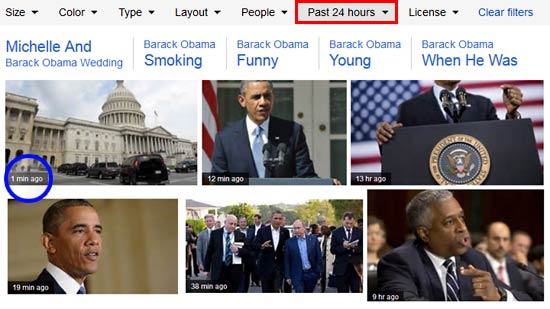
Each minute, millions of pictures get posted on the internet. And within this high-traffic driven and constantly changing network, finding a picture which was published a few hours ago, a month ago, or even a year ago may at first seem like a difficult task. But Bing’s Image Search can help you tackle this problem and get all the fresh visual content that you need. This process of narrowing down your search is achieved by using Bing Image Search’s Date filter.
To learn more, click the link below.
Tutorial Code: 09 12 07
Previous: 09 12 06 Bing Images Search by People
Next: 09 12 08 Bing Images Search by License
Filed Under:
B
Tagged as: 09-12, Bing Image Search, Pictures and Visuals, PowerPoint Tutorials
Comments Off on Bing Image Search: Bing Images Search by Date
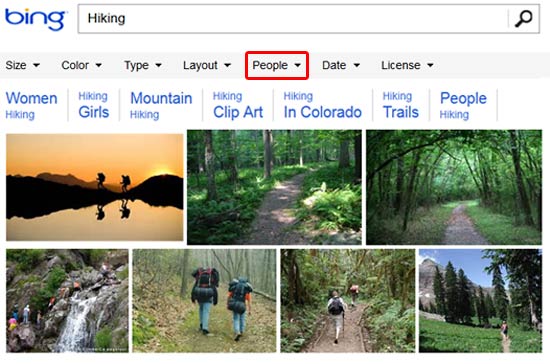
Some keywords just belong to people! Typically, most pictures that are related to movies, sports, community activity, or physical fitness will have a human factor involved. So, it is not surprising that most pictures that show up as results for such keywords include people! Bing Image Search’s People filter goes a little more further, because it allows you to restrict your search to pictures where people’s faces are prominent, or their heads and shoulders are more prominent.
To learn more, click the link below.
Tutorial Code: 09 12 06
Previous: 09 12 05 Bing Images Search by Layout
Next: 09 12 07 Bing Images Search by Date
Filed Under:
B
Tagged as: 09-12, Bing Image Search, Pictures and Visuals, PowerPoint Tutorials
Comments Off on Bing Image Search: Bing Images Search by People
Searching for the right picture online involves more than just entering a search term and then praying that you find a picture that works best for you! You need to do a little more, and that “little more” may be as simple a task as using a filter on the Bing Image Search site. Several common filters are available to narrow down your search results on Bing Images Search, and one of these filters is Layout. With the Layout filter, you can restrict your search to pictures which are widescreen, square, or tall in orientation.
To learn more, click the link below.

Tutorial Code: 09 12 05
Previous: 09 12 04 Bing Images Search by Type
Next: 09 12 06 Bing Images Search by People
Filed Under:
B
Tagged as: 09-12, Bing Image Search, Pictures and Visuals, PowerPoint Tutorials
Comments Off on Bing Image Search: Bing Images Search by Layout
Microsoft and the Office logo are trademarks or registered trademarks of Microsoft Corporation in the United States and/or other countries.