
This is the print version of this page. All content is copyright Indezine.com 2000-2026.
Definitions and resources for terms and techniques used in the world of presentations
See Also:
PowerPoint and Presenting Notes
PowerPoint and Presenting Glossary
Presentations Glossary in alphabetical order:
A |
B |
C |
D |
E |
F |
G |
H |
I |
J |
K |
L |
M |
N |
O |
P |
Q |
R |
S |
T |
U |
V |
W |
X |
Y |
Z
Adding sound effects to slide transitions in PowerPoint is a decision that needs so much thought because a sound playing with every slide transition can unnecessarily distract your audience. Having said that, there are occasions when a sound effect can be wisely applied to PowerPoint slide transitions, especially with picture slides, or maybe even a chime sound for just one slide?
To learn more, choose your version of PowerPoint. If we do not have a tutorial for your version of PowerPoint, explore the version closest to the one you use.
Slide Transition Sounds in PowerPoint 2013
Slide Transition Sounds in PowerPoint 2010
Slide Transition Sounds in PowerPoint 2011

Tutorial Code: 13 08 04
Previous: 13 08 03 Slide Transition Timings in PowerPoint
Next: 13 08 05 Slide Transition Effect Options in PowerPoint
Filed Under:
S
Tagged as: 13-08, Animations and Transitions, PowerPoint Tutorials, Slide Transitions
Comments Off on Slide Transitions: Slide Transition Sounds in PowerPoint
Do you have a presentation that contains text that needs to be spell-checked in more than one language? Or do you and your client or colleague work with different localized versions of Microsoft PowerPoint? It may be that you use English (US) and color is a perfectly valid spelling, but someone else in another part of the world uses English (UK) and their spell checker suggests that the word color be changed to colour.
To learn more, choose your version of PowerPoint. If we do not have a tutorial for your version of PowerPoint, explore the version closest to the one you use.
Setting Proofing Language for Text in PowerPoint 365
Setting Proofing Language for Text in PowerPoint 2013
Setting Proofing Language for Text in PowerPoint 2010
Setting Proofing Language for Text in PowerPoint 2011

Tutorial Code: 05 08 19
Previous: 05 08 18 Language Options on the Status Bar in PowerPoint
Next: 05 08 20 Changing Proofing Language for an Entire Presentation in PowerPoint
Filed Under:
S
Tagged as: 05-08, AutoCorrect, PowerPoint Tutorials, Spelling, Spelling AutoCorrect and Reference Tools, Text and Fonts
Comments Off on Spelling, AutoCorrect, and Reference Tools: Setting Proofing Language for Text in PowerPoint
Every transition you add to a slide within PowerPoint has a fixed, default duration. Some transitions such as Cut happen sooner than you can imagine (just 0.10 seconds). Some others like Reveal can take 3.40 seconds to be done with.
To learn more, choose your version of PowerPoint. If we do not have a tutorial for your version of PowerPoint, explore the version closest to the one you use.
Slide Transition Duration in PowerPoint 2013
Slide Transition Duration in PowerPoint 2010
Slide Transition Duration in PowerPoint 2011

Tutorial Code: 13 08 02
Previous: 13 08 01 Slide Transitions in PowerPoint
Next: 13 08 03 Slide Transition Timings in PowerPoint
Filed Under:
S
Tagged as: 13-08, Animations and Transitions, PowerPoint Tutorials, Slide Transitions
Comments Off on Slide Transitions: Slide Transition Duration in PowerPoint
You may recall that the option to insert online YouTube videos was removed a while ago due to code discrepancies in the syntax that Google started to use for YouTube embeds.
To learn more, choose your version of PowerPoint. If we do not have a tutorial for your version of PowerPoint, explore the version closest to the one you use.
Support for YouTube Videos in PowerPoint 2013 and 2010

Tutorial Code: 14 07 02
Previous: 14 07 01 Troubleshooting Video Playback
Next: 14 07 03 Missing “Video from Web Site” Option in PowerPoint
Filed Under:
V
Tagged as: 14-07, Multimedia, PowerPoint Tutorials, Video Troubleshooting
Comments Off on Video Troubleshooting: Support for YouTube Videos in PowerPoint
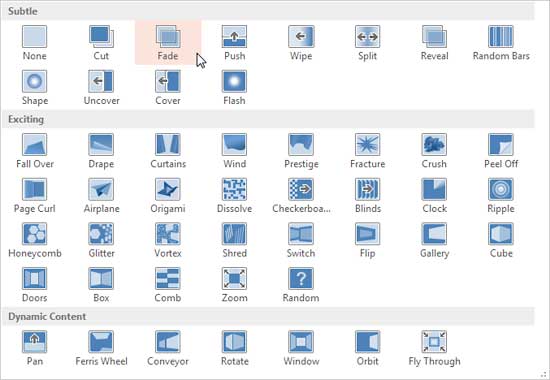
Slide transitions do more than causing some movement between one slide and the next. You can actually do a slide transition that is abrupt without any effect or you could look at any of the transition effects, all the way from simple fades and wipes to something that does not cause a vertigo! In addition, you can set timings for transitions and also accompanied by transition sounds.
To learn more, choose your version of PowerPoint. If we do not have a tutorial for your version of PowerPoint, explore the version closest to the one you use.
Slide Transitions in PowerPoint 2013
Slide Transitions in PowerPoint 2010
Slide Transitions in PowerPoint 2011
Tutorial Code: 13 08 01
Previous: 13 07 01 Add-ins for Animation
Next: 13 08 02 Slide Transition Duration in PowerPoint
Filed Under:
S
Tagged as: 13-08, Animations and Transitions, PowerPoint Tutorials, Slide Transitions
Comments Off on Slide Transitions: Slide Transitions in PowerPoint
Microsoft and the Office logo are trademarks or registered trademarks of Microsoft Corporation in the United States and/or other countries.