
This is the print version of this page. All content is copyright Indezine.com 2000-2026.
Definitions and resources for terms and techniques used in the world of presentations
See Also:
PowerPoint and Presenting Notes
PowerPoint and Presenting Glossary
Presentations Glossary in alphabetical order:
A |
B |
C |
D |
E |
F |
G |
H |
I |
J |
K |
L |
M |
N |
O |
P |
Q |
R |
S |
T |
U |
V |
W |
X |
Y |
Z

Kristaps Petersons is from Riga, Latvia (Europe). He’s one of the members of the board of Directors at the Presentation Guild. With more than 15 years of experience in national and international broadcast journalism and film-making, Kristaps creates high-stakes lobby, sales and image presentations to his clients since 2015. Among his clients are names like Roche, Novartis, McDonald’s, Carlsberg Group, Volkswagen AG and governments like Canada, the UAE, Switzerland, Sweden, Estonia and Latvia.
Here’s a list of links on Indezine.com where he has been featured:
 Presentation Summit 2022: Conversation with Kristaps Petersons
May 26, 2022
Filed Under:
K
Tagged as: Personality
Comments Off on Kristaps Petersons
A surface chart is useful when you want to find optimum combinations between two sets of data. As in a topographic map, colors and patterns indicate areas that are in the same range of values. Use a surface chart when both categories and data series are numeric values.
To learn more, choose your version of PowerPoint. If we do not have a tutorial for your version of PowerPoint, explore the version closest to the one you use.

Tutorial Code: 10 14 09
Previous: 10 14 08 Stock Charts in PowerPoint
Next: 10 14 10 Doughnut (Donut) Charts in PowerPoint
Filed Under:
P
Tagged as: 10-14, Charts and Graphs, PowerPoint Chart Types, PowerPoint Tutorials
Comments Off on PowerPoint Chart Types: Surface Charts in PowerPoint
While it’s easy and effective to use Morph transition effects between typical slides, curves, or even exclamation-named objects, there are many more Morph tricks to play with. Morph allows you to play with words and characters, and in this tutorial, we will explore using the Morph transition effect in PowerPoint to create animated effects using words. In a subsequent tutorial, we will explore animating on the character level.
To learn more, choose your version of PowerPoint. If we do not have a tutorial for your version of PowerPoint, explore the version closest to the one you use.
Using the Morph Transition with Words in PowerPoint 365

Tutorial Code: 13 10 04
Previous: 13 10 03 Using Exclamation Named Objects with Morph in PowerPoint
Next: 13 10 05 Using the Morph Transition with Characters in PowerPoint
Filed Under:
M
Tagged as: 13-10, Animations and Transitions, Morph in PowerPoint, PowerPoint Tutorials
Comments Off on Morph in PowerPoint: Using the Morph Transition with Words in PowerPoint
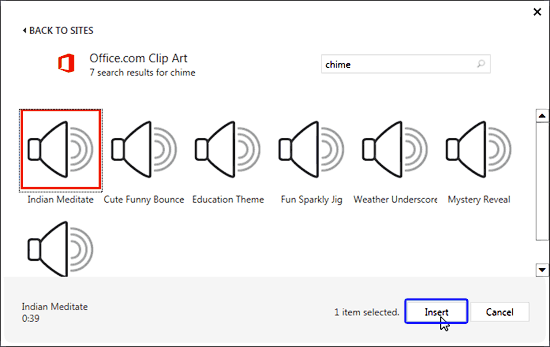
You can insert an audio file from your PC into your PowerPoint slide. PowerPoint 2013 even enables you to insert an audio file from online sources without any need to open your web browser. Follow these steps to insert an online audio clip into your PowerPoint presentation.
To learn more, choose your version of PowerPoint. If we do not have a tutorial for your version of PowerPoint, explore the version closest to the one you use.
Insert Online Audio in PowerPoint 2013
Tutorial Code: 14 09 04
Previous: 14 08 03 Sound Across Specific Slides in PowerPoint
Next: 14 10 01 Add Bookmarks for Audio Clips in PowerPoint
Filed Under:
A
Tagged as: 14-09, Audio in PowerPoint - Basics, Multimedia, PowerPoint Tutorials
Comments Off on Audio in PowerPoint – Basics: Insert Online Audio in PowerPoint
While we realize that this advice is not too helpful if your boss needs those charts in the next 30 minutes, there’s no debate about the fact that creating charts a little slowly can help you create better looking specimens that your audiences can assimilate better.
To learn more, click a link from the tutorials listed below.
PowerPoint Chart Tips 03: Don’t Hurry With Charts!

Tutorial Code: 10 15 04
Previous: 10 15 03 PowerPoint Chart Tips 02: Plan Your Chart Type
Next: 10 15 05 PowerPoint Chart Tips 04: Inspiration is Not Afar
Filed Under:
T
Tagged as: 10-15, Charts and Graphs, PowerPoint Tutorials, Ten Tips for Cool PowerPoint Charts
Comments Off on Ten Tips for Cool PowerPoint Charts: Don’t Hurry With Charts!
Microsoft and the Office logo are trademarks or registered trademarks of Microsoft Corporation in the United States and/or other countries.