
This is the print version of this page. All content is copyright Indezine.com 2000-2026.
Definitions and resources for terms and techniques used in the world of presentations
See Also:
PowerPoint and Presenting Notes
PowerPoint and Presenting Glossary
Presentations Glossary in alphabetical order:
A |
B |
C |
D |
E |
F |
G |
H |
I |
J |
K |
L |
M |
N |
O |
P |
Q |
R |
S |
T |
U |
V |
W |
X |
Y |
Z
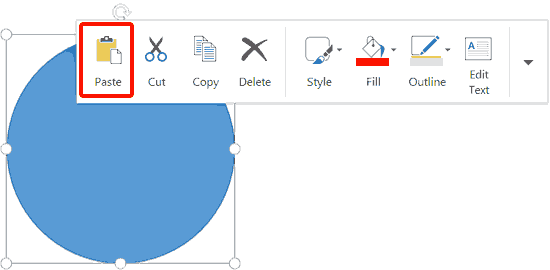
Whenever you tap on an object in Word, Excel, or PowerPoint versions of Office 2013 while using a touch device such as the Microsoft Surface, you will see a floatie spawning right there! In our Touch Floatie within PowerPoint Touch tutorial, we explored how you can bring up floaties with differing options, depending upon the object you tap. The resultant floatie contains all the options required to format the tapped slide object.
To learn more, choose your version of PowerPoint. If we do not have a tutorial for your version of PowerPoint, explore the version closest to the one you use.
Shape Floatie within PowerPoint Touch in Office 2013

Tutorial Code: 23 02 02
Previous: 23 02 01 Touch Floatie within PowerPoint Touch
Next: 23 02 03 Picture Floatie within PowerPoint Touch
Filed Under:
U
Tagged as: 23-02, PowerPoint Tutorials, Touch Devices, Using the Touch Floatie
Comments Off on Using Floaties: Shape Floatie within PowerPoint Touch
Most of you are aware of mini toolbars in PowerPoint for Windows (also in Word and Excel). These show up with several options that let you alter text or shape attributes. However, if you are using Office 2013 on a touch device such as Microsoft Surface, you’ll see floaties which are quite similar to the mini toolbars. They are different too because they have fewer options, and are also equipped with larger buttons so that you can tap on them easily.
To learn more, choose your version of PowerPoint. If we do not have a tutorial for your version of PowerPoint, explore the version closest to the one you use.
Touch Floatie within PowerPoint Touch in Office 2013
Tutorial Code: 23 02 01
Previous: 23 01 01 Selecting Shapes in Office
Next: 23 02 02 Shape Floatie within PowerPoint Touch
Filed Under:
U
Tagged as: 23-02, PowerPoint Tutorials, Touch Devices, Using the Touch Floatie
Comments Off on Using Floaties: Touch Floatie within PowerPoint Touch
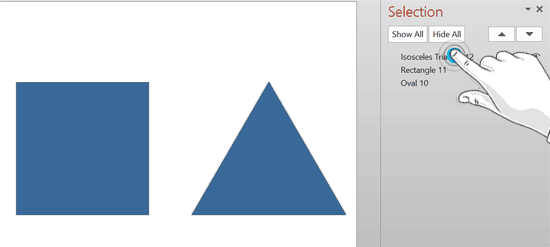
Unlike previous versions, newer PowerPoint for Windows and also Word and Excel versions, are completely touch-aware. Almost all options are accessible on any of the touch-capable devices, including Microsoft’s own Surface tablets. While your Surface may be equipped with an additional type cover or even a mouse, you really do not need either a keyboard or a mouse to use Word, Excel, or PowerPoint on a touch-enabled tablet.
To learn more, choose your version of PowerPoint. If we do not have a tutorial for your version of PowerPoint, explore the version closest to the one you use.
Selecting Shapes in Office 2013 in PowerPoint Touch for Windows
Tutorial Code: 23 01 01
Previous: 22 06 01 PowerPoint for Mac Troubleshooting Issues
Next: 23 02 01 Touch Floatie within PowerPoint Touch
Filed Under:
S
Tagged as: 23-01, PowerPoint Tutorials, Selecting Shapes, Touch Devices
Comments Off on Selecting Shapes: Selecting Shapes in Office

Tommy Powell is from Neuxpower, a software solutions company based in the UK. Neuxpower custom-builds both stand-alone applications and add-ins that enhance existing software such as Microsoft Office. Their commercially-available file optimizer, NXPowerLite radically reduces the size of PowerPoint, Word, Excel and JPEG files.
Here’s a list of links on Indezine and similar sites where he has been featured:
 NXPowerLite for Office 2010: Conversation with Tommy Powell
November 26, 2010
NXPowerLite for File Servers: Conversation with Tommy Powell
June 10, 2010
 Neuxpower NXPowerLite 3.6
June 12, 2008
NXPowerLite 3.5: Conversation with Tommy Powell
January 22, 2008
NXPowerLite 3.5 Released
January 16, 2008
Filed Under:
T
Tagged as: Personality
Comments Off on Tommy Powell

Daniel Park has spent more than a decade in multimedia development and has worked with Camtasia Studio since its introduction as Camtasia back at the start of the millennium. He served as a trainer and technical writer before scoring a full-time gig at TechSmith Corporation, where he worked in international development, marketing, database administration, and (of course) video creation.
Here’s a list of links on Indezine.com where he has been featured:
 The Screencaster: Lessons to the aspiring screencaster from Strunk & White
March 29, 2008
An Interview with Daniel Park
August 4, 2006
Filed Under:
D
Tagged as: Personality
Comments Off on Daniel Park
Microsoft and the Office logo are trademarks or registered trademarks of Microsoft Corporation in the United States and/or other countries.