
This is the print version of this page. All content is copyright Indezine.com 2000-2026.
Definitions and resources for terms and techniques used in the world of presentations
See Also:
PowerPoint and Presenting Notes
PowerPoint and Presenting Glossary
Presentations Glossary in alphabetical order:
A |
B |
C |
D |
E |
F |
G |
H |
I |
J |
K |
L |
M |
N |
O |
P |
Q |
R |
S |
T |
U |
V |
W |
X |
Y |
Z

Kurt Dupont, based out of Belgium heads PresentationPoint, a company that creates several amazing PowerPoint add-ins. After his Computer Science studies, Kurt started with Andersen Consulting (Accenture nowadays) in Brussels. After three years he moved to the Brussels Airport Terminal Company that runs the Brussels airport – this last placement inspired the start-up of Take-off (now known as PresentationPoint) in 1998.
Filed Under:
K
Tagged as: Add-in, Kurt Dupont, Personality, PowerPoint, PresentationPoint
Comments Off on Kurt Dupont
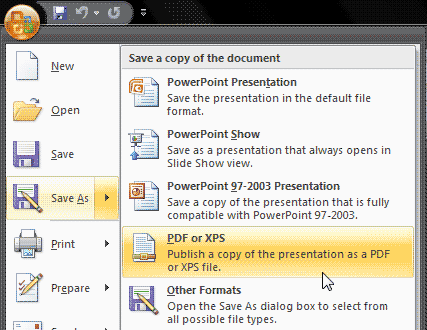
Saving a PowerPoint presentation as a PDF has its pros and cons. The biggest advantage is that recipients won’t be able to edit, and you can embed fonts easily. An even better advantage is that you may use PDFs as a substitute for printing drafts or finished slides, thus saving so much paper. Disadvantages include that you cannot be entirely multimedia-friendly. Whatever your thoughts may be, PowerPoint makes it very easy to create PDFs.
To learn more, choose your version of PowerPoint. If we do not have a tutorial for your version of PowerPoint, explore the version closest to the one you use.
Save as PDF in PowerPoint 2016
Save as PDF in PowerPoint 2013
Save as PDF in PowerPoint 2010
Save as PDF in PowerPoint 2007
Save as PDF in PowerPoint 2011
Tutorial Code: 16 04 04
Previous: 16 04 03 Exporting Graphic File Formats in PowerPoint
Next: 16 04 05 Getting Save as PDF Add-in in PowerPoint
Filed Under:
E
Tagged as: 16-04, Exporting Slides, PowerPoint Tutorials, Share and Prepare
Comments Off on Exporting Slides: Save as PDF in PowerPoint
Once you place a Shape on a PowerPoint slide, you may format it by changing its fill or outline — or you may add animation to it. Later if you realize that you used a wrong form — maybe you used a Star in place of a Triangle, you may be tempted to delete the original Shape altogether and start from scratch by adding a new one, and change its fill and add animation to it.
To learn more, choose your version of PowerPoint. If we do not have a tutorial for your version of PowerPoint, explore the version closest to the one you use.
Change One Shape to Another in PowerPoint 365
Change One Shape to Another in PowerPoint 2016
Change One Shape to Another in PowerPoint 2013
Change One Shape to Another in PowerPoint 2010
Change One Shape to Another in PowerPoint 2002 and 2003
Change One Shape to Another in PowerPoint 365
Change One Shape to Another in PowerPoint 2011
Change One Shape to Another in PowerPoint for the Web

Tutorial Code: 06 02 01
Previous: 06 01 07 Rotation Fun in PowerPoint
Next: 06 02 02 Manipulating Shapes by Dragging Yellow Handles in PowerPoint
Filed Under:
S
Tagged as: 06-02, Advanced Shape Techniques, PowerPoint Tutorials, Shapes
Comments Off on Advanced Shape Techniques: Change One Shape to Another in PowerPoint
Have you ever been in a situation where your presentation looked so awesome with some amazing typography, but when you opened the same presentation on another computer, the text looked positively terrible! This behavior may happen if the font you used is not available on the other computer. The best solution to this problem is to use safe fonts that are available on most computers, or you may also explore the option to embed fonts in your PowerPoint presentation.
Filed Under:
F
Tagged as: 05-02, Embed Fonts in PowerPoint, Fonts, PowerPoint Tutorials, Text and Fonts
Comments Off on Fonts: Embed Fonts in PowerPoint

Sunni Brown is Founder and Chief Human Potentialist of Sunni Brown Ink, an international consultancy supporting organizational problem-solving around communication, creativity and culture. She was named one of the “100 Most Creative People in Business” and one of the “10 Most Creative People on Twitter” by Fast Company. She is a global public speaker and the best-selling author of Gamestorming and The Doodle Revolution. Her TED Talk on doodling has drawn more than a million views and her work has been featured in such major U.S. publications as The New York Times, The Wall Street Journal, Time Magazine, WIRED and Entrepreneur.
Here is a list of her features on Indezine:
 Presentation Summit 2016: Conversation with Sunni Brown
September 29, 2016
Filed Under:
S
Tagged as: Sunni Brown
Comments Off on Sunni Brown
Microsoft and the Office logo are trademarks or registered trademarks of Microsoft Corporation in the United States and/or other countries.