
This is the print version of this page. All content is copyright Indezine.com 2000-2026.
Definitions and resources for terms and techniques used in the world of presentations
See Also:
PowerPoint and Presenting Notes
PowerPoint and Presenting Glossary
Presentations Glossary in alphabetical order:
A |
B |
C |
D |
E |
F |
G |
H |
I |
J |
K |
L |
M |
N |
O |
P |
Q |
R |
S |
T |
U |
V |
W |
X |
Y |
Z
The Outline view in PowerPoint essentially brings up the Outline pane on the left side of PowerPoint interface. Note that this now replaces the Slides Pane that shows up in Normal view.
Filed Under:
T
Tagged as: Interface and Basics, PowerPoint Tutorials, Text and Outlines
Comments Off on Text and Outlines: Outline Pane Options in PowerPoint
Add a gradient fill to your shape, and you may run into limitations! For one, PowerPoint’s default gradient options choose all the gradient colors for you, and all available gradients seems to be based on the same color family. While this sort of restraint does keep your slides looking consistent and aesthetic, they also prevent you from playing more with gradients. To play more, you must choose the More Gradients option, this option leads you to a detailed gradient editor that’s capable of making changes to the gradient type, direction, angle, color, etc.
Filed Under:
F
Tagged as: 08-01, Fills for Shapes, Fills Lines and Effects, PowerPoint Tutorials
Comments Off on Shape Fills: More Gradients in PowerPoint
Microsoft Office applications work well with cloud platforms such as OneDrive. Roaming capabilities enable when you log into your Microsoft account within Office applications such as PowerPoint. Once logged in, all your settings, including your recent files or templates, will be synced across all your devices, including laptops, tablets, and even smartphones.
To learn more, choose your version of PowerPoint. If we do not have a tutorial for your version of PowerPoint, explore the version closest to the one you use.
Add Services in PowerPoint 365
Add Services in PowerPoint 2016
Add Services in PowerPoint 2013
Add Services in PowerPoint 2016

Tutorial Code: 01 08 20
Previous: 01 08 19 Accessibility Program Options in PowerPoint
Next: 01 08 21 Manage and Remove Connected Services in PowerPoint
Filed Under:
F
Tagged as: 01-08, File Types File Menu and Backstage View, Interface and Basics, PowerPoint Tutorials
Comments Off on File Types, File Menu, and Backstage View: Add Services in PowerPoint
PowerPoint for the Web may have fewer options than desktop versions of PowerPoint. Yet, this version does have one option that makes it so easy to share your PowerPoint presentations on your website or blog post. Here, we explore the Embed option, that generates embed code for your presentation.
To learn more, choose your version of PowerPoint. If we do not have a tutorial for your version of PowerPoint, explore the version closest to the one you use.
Embed PowerPoint Presentations in PowerPoint for the Web
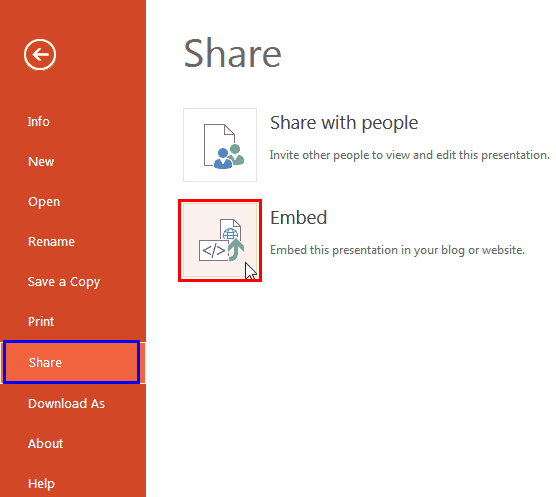
Tutorial Code: 01 08 12
Previous: 01 08 11 Share Tab in Backstage View in PowerPoint
Next: 01 08 13 Account Tab in Backstage View in PowerPoint
Filed Under:
F
Tagged as: 01-08, File Types File Menu and Backstage View, Interface and Basics, PowerPoint Tutorials
Comments Off on File Types, File Menu, and Backstage View: Embed PowerPoint Presentations
Among the tabs within Backstage View, we have already explored options such as New, Recent, Print, etc. Here, we will explore the Help option that provides you assistance and documentation.
To learn more, choose your version of PowerPoint. If we do not have a tutorial for your version of PowerPoint, explore the version closest to the one you use.
Help Tab of Backstage View in PowerPoint 2010

Tutorial Code: 01 08 14
Previous: 01 08 13 Account Tab of Backstage View in PowerPoint
Next: 01 08 15 Options Tab of Backstage View in PowerPoint
Filed Under:
F
Tagged as: 01-08, File Types File Menu and Backstage View, Interface and Basics, PowerPoint Tutorials
Comments Off on File Types, File Menu, and Backstage View: Help Tab of Backstage View in PowerPoint
Microsoft and the Office logo are trademarks or registered trademarks of Microsoft Corporation in the United States and/or other countries.