
This is the print version of this page. All content is copyright Indezine.com 2000-2026.
Definitions and resources for terms and techniques used in the world of presentations
See Also:
PowerPoint and Presenting Notes
PowerPoint and Presenting Glossary
Presentations Glossary in alphabetical order:
A |
B |
C |
D |
E |
F |
G |
H |
I |
J |
K |
L |
M |
N |
O |
P |
Q |
R |
S |
T |
U |
V |
W |
X |
Y |
Z

Janet Giesen is Senior Director of Business Development and Strategic Partnerships at Shutterstock. She runs integrated partnerships, co-marketing initiatives, and data deals for the company. Before joining Shutterstock, Janet managed affiliate and digital media partnerships for American Express OPEN.
Here’s a list of links on Indezine.com where she has been featured:
 Shutterstock Plug-in for PowerPoint on Mac: Conversation with Janet Giesen
August 5, 2016
 Shutterstock Plug-in for PowerPoint: Conversation with Janet Giesen
June 17, 2016
Filed Under:
J
Tagged as: Personality
Comments Off on Janet Giesen
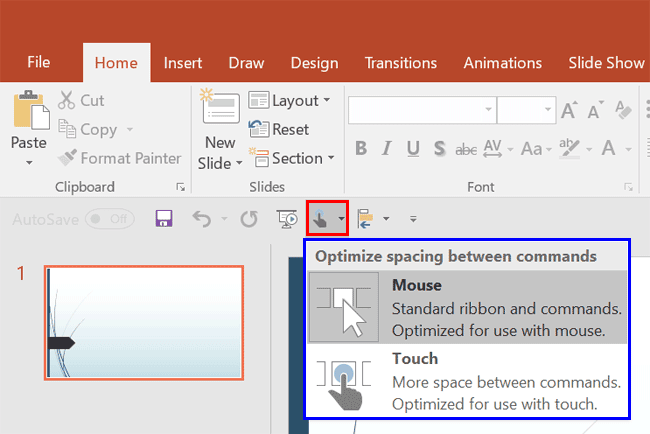
Look closely at the interface within PowerPoint, particularly the Customize Quick Access Toolbar drop-down menu, and you’ll find the Touch/Mouse Mode option. Essentially, this option is a toggle button that alternates between touch and mouse modes.
To learn more, choose your version of PowerPoint. If we do not have a tutorial for your version of PowerPoint, explore the version closest to the one you use.
Touch or Mouse Mode in PowerPoint 365
Touch or Mouse Mode in PowerPoint 2016
Touch or Mouse Mode in PowerPoint 2013
Tutorial Code: 18 02 01
Previous: 18 01 03 Running Color Blind Tests Using Images Exported from PowerPoint
Next: 18 03 01 STAMP – Accessibility Add-in in PowerPoint
Filed Under:
T
Tagged as: 18-02, Accessibility, PowerPoint Tutorials, Touch-Access
Comments Off on Touch-Access: Touch or Mouse Mode in PowerPoint

Yousef “Yoyo” Abu Ghaidah is a PowerPoint ninja who founded Slide Cow, a learning platform for all things PowerPoint, presentations, and public speaking. When he’s not designing slides or giving presentations, he’s on another coffee run.
Here’s a list of links on Indezine.com where he has been featured:
 Here’s How President Obama Gave Stellar Inspirational Speeches
March 21, 2018
Why You Should Never (Ever) Memorize Your Presentation
January 16, 2018
Filed Under:
Y
Tagged as: Personality
Comments Off on Yousef Abu Ghaidah

Heather Ackmann is a Microsoft MVP and full-time author and trainer for AHA Learning Solutions, specializing in Microsoft Office, business professional, and soft skills training videos and educational materials.
Here’s a list of links on Indezine.com where she has been featured:
 Presentation Summit 2016: Conversation with Heather Ackmann
August 24, 2016
 Conversational Office 2016: Conversation with Heather Ackmann
April 29, 2016
Filed Under:
H
Tagged as: Personality
Comments Off on Heather Ackmann
In this tutorial, we will look at how you can create slides that are accessible to all types of color-blind users. We explore the concept of color-blindness and then show you how you can create your own, accessible slides.
To learn more, choose your version of PowerPoint. If we do not have a tutorial for your version of PowerPoint, explore the version closest to the one you use.
PowerPoint Slides for Color-Blind Audiences

Tutorial Code: 18 01 01
Previous: 17 04 01 Add Sound and Music to a PDF
Next: 18 01 02 Running Color Blind Tests in PowerPoint
Filed Under:
C
Tagged as: 18-01, Accessibility, Color-Blindness, PowerPoint Tutorials
Comments Off on Color-Blindness: PowerPoint Slides for Color-Blind Audiences
Microsoft and the Office logo are trademarks or registered trademarks of Microsoft Corporation in the United States and/or other countries.