
This is the print version of this page. All content is copyright Indezine.com 2000-2026.
Definitions and resources for terms and techniques used in the world of presentations
See Also:
PowerPoint and Presenting Notes
PowerPoint and Presenting Glossary
Presentations Glossary in alphabetical order:
A |
B |
C |
D |
E |
F |
G |
H |
I |
J |
K |
L |
M |
N |
O |
P |
Q |
R |
S |
T |
U |
V |
W |
X |
Y |
Z
The situation is familiar: you or someone else uses a non-standard font (not a PowerPoint safe font) in your presentation. You then open this same presentation on another computer, and PowerPoint uses another font to display the same text. Why does it do so? The reason is simple enough: the font originally used is not available on the other system. And that is not even half the problem.
Filed Under:
F
Tagged as: 05-02, Fonts, PowerPoint Tutorials, Text and Fonts
Comments Off on Fonts: Find Substituted Fonts in PowerPoint

Puneet Gogia is the Co-Founder of Excel Champs and a spreadsheets expert. Through his blog, he has helped thousands of people to understand the power of spreadsheets. You can find him online, tweeting about Excel, on a running track, or sometimes hiking up a mountain.
Filed Under:
P
Tagged as: Personality, Puneet Gogia
Comments Off on Puneet Gogia
Yes, you can create timelines in PowerPoint, by using shapes or via the SmartArt option, but what if you could create a timeline by doing nothing other than typing into a bulleted list, and then make PowerPoint change the content into a properly formatted timeline? Wouldn’t that be cool?
Filed Under:
P
Tagged as: 19-01, PowerPoint Cool Stuff, PowerPoint Designer, PowerPoint Tutorials
Comments Off on PowerPoint Designer: Creating Timelines with PowerPoint Designer in PowerPoint
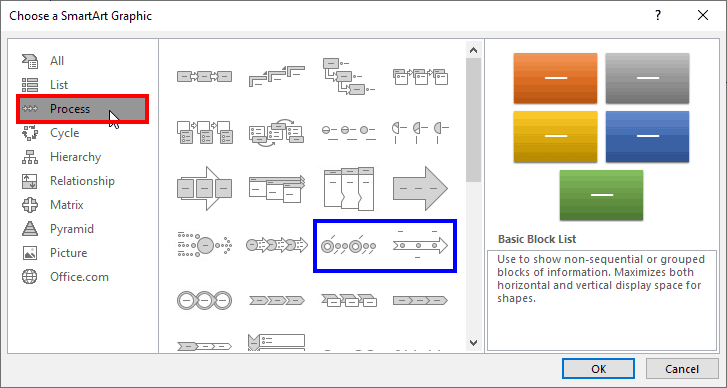
While PowerPoint does not have a Timelines category within the SmartArt graphics available, you can still find some Timeline variants hidden within the Process category.
To learn more, choose your version of PowerPoint. If we do not have a tutorial for your version of PowerPoint, explore the version closest to the one you use.
Creating Timelines Using SmartArt in PowerPoint 365 for Windows
Tutorial Code: 11 03 08
Previous: 11 03 07 Add Office.com SmartArt Graphics
Next: 11 03 09 Get More SmartArt Graphics
Filed Under:
A
Tagged as: 11-03, Advanced, PowerPoint Tutorials, SmartArt, SmartArt Graphics
Comments Off on Advanced SmartArt: Creating Timelines Using SmartArt in PowerPoint
We learned about using safe fonts in PowerPoint, especially if you want to share your slides with others who may not have the required fonts. In simple terms, this means using fonts such as Calibri, Arial, or Times New Roman in your slides so that almost anyone can see the slides identically, as you see them! Sometimes, this may not be a bad idea, but you do have to narrow down your choices to the bare basics. Fortunately, there are some alternatives to safe fonts too, and some of these approaches may work for you. The best part is that you may be able to show your slides with the fonts that you like!
Filed Under:
F
Tagged as: 05-02, Fonts, PowerPoint Tutorials, Text and Fonts
Comments Off on Fonts: Alternatives to Safe Fonts in PowerPoint
Microsoft and the Office logo are trademarks or registered trademarks of Microsoft Corporation in the United States and/or other countries.