
This is the print version of this page. All content is copyright Indezine.com 2000-2026.
Definitions and resources for terms and techniques used in the world of presentations
See Also:
PowerPoint and Presenting Notes
PowerPoint and Presenting Glossary
Presentations Glossary in alphabetical order:
A |
B |
C |
D |
E |
F |
G |
H |
I |
J |
K |
L |
M |
N |
O |
P |
Q |
R |
S |
T |
U |
V |
W |
X |
Y |
Z

Richard Goring is a Director at BrightCarbon, the specialist presentation and eLearning agency. He enjoys helping people create engaging content and communicate effectively using visuals, diagrams, and animated sequences that explain and reinforce the key points.
Filed Under:
R
Tagged as: MVP, Personality, Richard Goring
Comments Off on Richard Goring
While it is easy to work with tables in PowerPoint, you will always need to select some particular part of the table to work with this means you will have to select an individual table cell, or even separate rows and columns while performing various tasks such as populating tables with content, or adding and removing table rows/columns, or merging and splitting table cells. Sometimes you will also need to select contiguous cells in both rows and columns, or even the entire table itself.
To learn more, choose your version of PowerPoint. If we do not have a tutorial for your version of PowerPoint, explore the version closest to the one you use.
Select Table Cells, Rows, and Columns in PowerPoint 2013
Select Table Cells, Rows, and Columns in PowerPoint 2011

Filed Under:
T
Tagged as: 12-03, PowerPoint Tutorials, Table Cells, Tables
Comments Off on Table Cells: Select Table Cells, Rows, and Columns
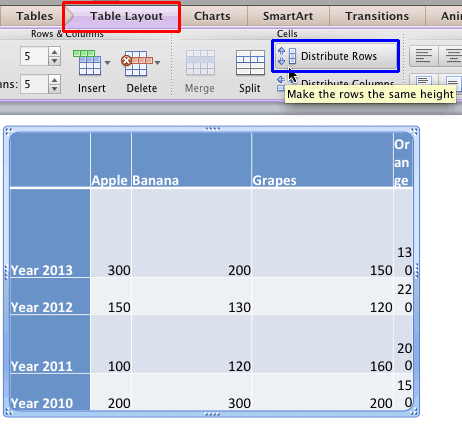
Tables can make your data or other content look organized and make it easy for your audiences to quickly understand how the content in one or more cells relates to the content in other cells. However, even with all this organization built-in within the tabular structure, tables still need aesthetics. A table on your slide looks good when its rows and columns are arranged and sized in a proper manner, and the table cell content is aligned well.
To learn more, choose your version of PowerPoint. If we do not have a tutorial for your version of PowerPoint, explore the version closest to the one you use.
Distribute Rows and Columns in PowerPoint 2013
Distribute Table Rows and Columns in PowerPoint 2011
Filed Under:
T
Tagged as: 12-03, PowerPoint Tutorials, Table Cells, Tables
Comments Off on Table Cells: Distribute Table Rows and Columns
Once you insert a table in PowerPoint, you will certainly want to fill it with some content. However, that does not mean your table is done and may never require any more changes to be made. Like anything else in life, tables need to grow and accommodate more content or they may even need to shed some of it. Adding or removing content within a table usually entails adding and removing table rows and columns, as required. You can add or remove these from the edges of the table, or even somewhere right in the middle of the existing rows and columns.
To learn more, choose your version of PowerPoint. If we do not have a tutorial for your version of PowerPoint, explore the version closest to the one you use.
Add and Remove Table Rows/Columns in PowerPoint 2013
Add and Remove Table Rows/Columns in PowerPoint 2011

Filed Under:
T
Tagged as: 12-03, PowerPoint Tutorials, Table Cells, Tables
Comments Off on Table Cells: Add and Remove Table Rows and Columns
We all use tables in our slides to present numeric data in an organized way so that the audience can easily comprehend or compare values, trends, or even messages. Inserting a new table on your PowerPoint slide and then entering content within this table is an easy task. However, what if you need to take a Word table into PowerPoint?
To learn more, choose your version of PowerPoint. If we do not have a tutorial for your version of PowerPoint, explore the version closest to the one you use.
Import Word Table Content in PowerPoint 2011

Filed Under:
I
Tagged as: 12-02, Import Tables, PowerPoint Tutorials, Tables
Comments Off on Import Tables: Import Word Table Content
Microsoft and the Office logo are trademarks or registered trademarks of Microsoft Corporation in the United States and/or other countries.