This is the print version of this page. All content is copyright Indezine.com 2000-2026.
Definitions and resources for terms and techniques used in the world of presentations
See Also:
PowerPoint and Presenting Notes
PowerPoint and Presenting Glossary
Presentations Glossary in alphabetical order:
A |
B |
C |
D |
E |
F |
G |
H |
I |
J |
K |
L |
M |
N |
O |
P |
Q |
R |
S |
T |
U |
V |
W |
X |
Y |
Z
A Glow effect adds a hazed color perimeter outside the shape area, and by default, the Glow colors emanate from the active Theme. These default Glow colors work most of the time, but of course, you can change the Glow color to something entirely different.
To learn more, choose your version of PowerPoint. If we do not have a tutorial for your version of PowerPoint, explore the version closest to the one you use.
More Glow Colors in PowerPoint 2016
More Glow Colors in PowerPoint 2013
More Glow Colors in PowerPoint 2010
More Glow Colors in PowerPoint 2007

Tutorial Code: 08 03 08
Previous: 08 03 07 Apply Glow Effects to Shapes in PowerPoint
Next: 08 03 09 Advanced Glow Options in PowerPoint
Filed Under:
S
Tagged as: 08-03, Fills Lines and Effects, PowerPoint Tutorials, Shape Effects
Comments Off on Shape Effects: More Glow Colors in PowerPoint
As part of our series on PowerPoint effects for shapes, we will explore the Glow effect. This effect adds a hazed color perimeter outside the shape area. This effect is an Outer Glow surrounding the shape. You can choose from various glow colors such as Theme colors or even any other color of your choice to match the look of the slide content.
To learn more, choose your version of PowerPoint. If we do not have a tutorial for your version of PowerPoint, explore the version closest to the one you use.
Apply Glow Effects to Shapes in PowerPoint 2016
Apply Glow Effects to Shapes in PowerPoint 2013
Apply Glow Effects to Shapes in PowerPoint 2010
Apply Glow Effects to Shapes in PowerPoint 2007
Apply Glow Effects to Shapes in PowerPoint 2011
Tutorial Code: 08 03 07
Previous: 08 03 06 Advanced Reflection Effect Options in PowerPoint
Next: 08 03 08 More Glow Colors in PowerPoint
Filed Under:
S
Tagged as: 08-03, Fills Lines and Effects, PowerPoint Tutorials, Shape Effects
Comments Off on Shape Effects: Apply Glow Effects to Shapes in PowerPoint
The Reflection effects that PowerPoint provides can be applied with a single click, and can indeed do wonders for your shapes. However, if you get too carried away by the swanky looking Reflections, you may end up distracting your audiences. Most of PowerPoint’s Reflection presets that you learned to apply in our Reflection Effects for Shapes in PowerPoint tutorial are attractive, yet somewhat distracting.
To learn more, choose your version of PowerPoint. If we do not have a tutorial for your version of PowerPoint, explore the version closest to the one you use.
Advanced Reflection Effect Options in PowerPoint 2016
Advanced Reflection Effect Options in PowerPoint 2013
Advanced Reflection Effect Options in PowerPoint 2010
Advanced Reflection Effect Options in PowerPoint 2011

Tutorial Code: 08 03 06
Previous: 08 03 05 Apply Reflection Effects to Shapes in PowerPoint
Next: 08 03 07 Apply Glow Effects to Shapes in PowerPoint
Filed Under:
S
Tagged as: 08-03, Fills Lines and Effects, PowerPoint Tutorials, Shape Effects
Comments Off on Shape Effects: Advanced Reflection Effect Options in PowerPoint
The Shadow effect in PowerPoint adds more depth to your selected shape, and you may achieve the perfect Shadow effect the very first time you use PowerPoint’s default Shadow options. However, you may want that Shadow to be a wee bit longer, or just a little less pronounced. Or maybe you want the Shadow to sport a color that’s different.
To learn more, choose your version of PowerPoint. If we do not have a tutorial for your version of PowerPoint, explore the version closest to the one you use.
Advanced Shadow Effect Options in PowerPoint 2016
Advanced Shadow Effect Options in PowerPoint 2013
Advanced Shadow Effect Options in PowerPoint 2010
Advanced Shadow Effect Options in PowerPoint 2007
Advanced Shadow Effect Options in PowerPoint 2003 and 2002
Advanced Shadow Effect Options in PowerPoint 2011
Tutorial Code: 08 03 04
Previous: 08 03 03 Apply Shadow Effects to Shapes in PowerPoint
Next: 08 03 05 Apply Reflection Effects to Shapes in PowerPoint
Filed Under:
S
Tagged as: 08-03, Fills Lines and Effects, PowerPoint Tutorials, Shape Effects
Comments Off on Shape Effects: Advanced Shadow Effect Options in PowerPoint
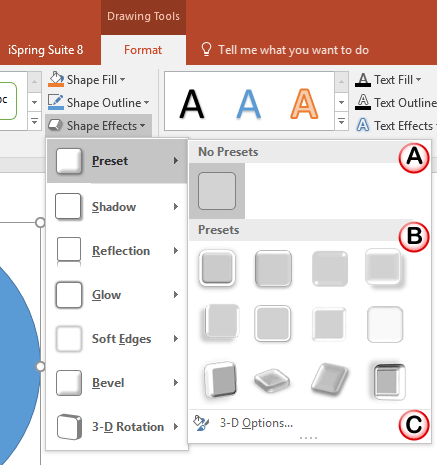
PowerPoint provides six types of Shape Effects; more than one of these effects can be applied to a selected shape. Some combinations of these effects look better than others. Having said so, practicing restraint not to go overboard with all effects is always a good thing. Also, trying out all the effect combinations may take a lot of time. Fortunately, the Presets option comes to your rescue. This option lets you use pre-combined combinations of the different effects. Figure 1, below shows some Preset effects applied to the same shape.
To learn more, choose your version of PowerPoint. If we do not have a tutorial for your version of PowerPoint, explore the version closest to the one you use.
Apply Preset Effects to Shapes in PowerPoint 2016
Apply Preset Effects to Shapes in PowerPoint 2013
Apply Preset Effects to Shapes in PowerPoint 2010
Apply Preset Effects to Shapes in PowerPoint 2007
Tutorial Code: 08 03 02
Previous: 08 03 01 Applying Effects for Shapes in PowerPoint
Next: 08 03 03 Apply Shadow Effects to Shapes in PowerPoint
Filed Under:
S
Tagged as: 08-03, Fills Lines and Effects, PowerPoint Tutorials, Shape Effects
Comments Off on Shape Effects: Apply Preset Effects to Shapes in PowerPoint
Microsoft and the Office logo are trademarks or registered trademarks of Microsoft Corporation in the United States and/or other countries.