
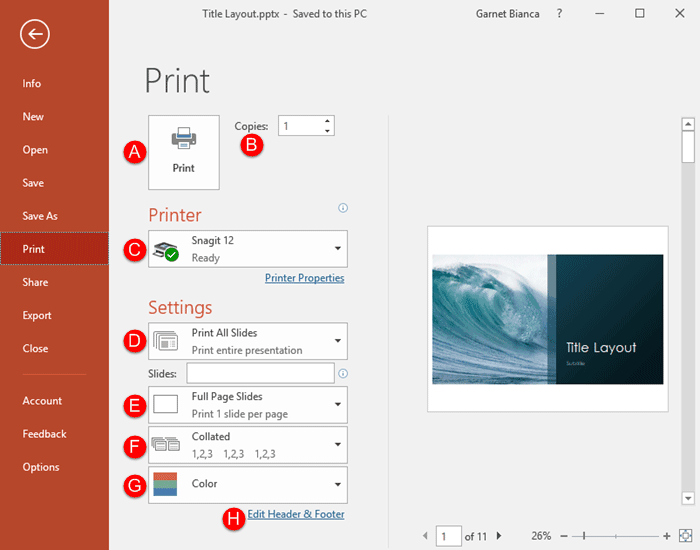
Among the tabs within Backstage View, we have already explored some options such as Open, New, Save, etc. Here, we will explore the Print option used to print the current presentation in the form of selected slides, notes pages, handouts, etc.
To learn more, choose your version of PowerPoint. If we do not have a tutorial for your version of PowerPoint, explore the version closest to the one you use.
Microsoft Windows
Print Tab of Backstage View in PowerPoint 365
Print Tab of Backstage View in PowerPoint 2019
Print Tab of Backstage View in PowerPoint 2016
Print Tab of Backstage View in PowerPoint 2013
Print Tab of Backstage View in PowerPoint 2010
Apple Mac
Print Tab of Backstage View in PowerPoint 365
Print Tab of Backstage View in PowerPoint 2019
PowerPoint for the Web
Print Tab of Backstage View in PowerPoint for the Web
Tutorial Code: 01 08 10
Previous: 01 08 09 Save and Save As Tabs of Backstage View in PowerPoint
Next 01 08 11 Share Tab of Backstage View in PowerPoint