
This is the print version of this page. All content is copyright Indezine.com 2000-2026.
Definitions and resources for terms and techniques used in the world of presentations
See Also:
PowerPoint and Presenting Notes
PowerPoint and Presenting Glossary
Presentations Glossary in alphabetical order:
A |
B |
C |
D |
E |
F |
G |
H |
I |
J |
K |
L |
M |
N |
O |
P |
Q |
R |
S |
T |
U |
V |
W |
X |
Y |
Z
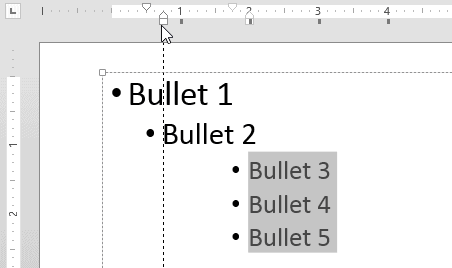
You have already explored how you can use the First Line Indent Marker and the Hanging Indent Marker to tweak bulleted paragraphs in PowerPoint. By tweaking, we mean adjusting the spacing before and after the bullet character.
To learn more, choose your version of PowerPoint. If we do not have a tutorial for your version of PowerPoint, explore the version closest to the one you use.
Tweak Bulleted Paragraphs With Left Indent Marker in PowerPoint 2013
Tweak Bulleted Paragraphs With Left Indent Marker in PowerPoint 2010
Tweak Bulleted Paragraphs With Left Indent Marker in PowerPoint 2011
Tutorial Code: 05 04 04
Previous: 05 04 03 Tweak Bulleted Lists With Hanging Indent Marker in PowerPoint
Next: 05 04 05 Set Text Indentation Using Numerical Values in PowerPoint
Filed Under:
I
Tagged as: 05-04, Indents and Markers, PowerPoint Tutorials, Text and Fonts
Comments Off on Indents and Markers: Tweak Bulleted Paragraphs With Left Indent Marker in PowerPoint
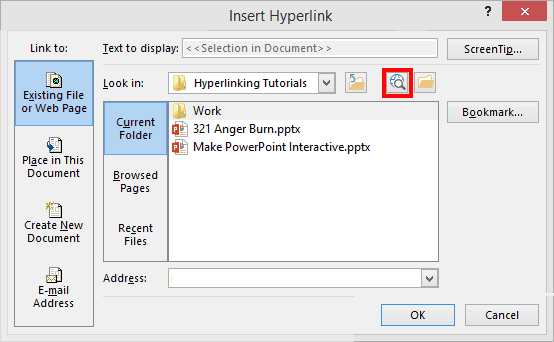
Linking from within PowerPoint allows you to use your slides as a jumping point to provide even more content! We all know that the internet is a storehouse of so much content, and sometimes you may want a click on your slide to open a web page. Show the web page to your audience, close it and you are back on the slide you clicked. You can now seamlessly move on to your next slide. This sort of activity is easy to recreate.
To learn more, click a link from the tutorials listed below.
Linking to Web Pages in PowerPoint 2013
Tutorial Code: 15 02 03
Previous: 15 02 02 Linking to Another Presentation in PowerPoint
Next: 15 02 04 Hyperlinking Text in PowerPoint
Filed Under:
H
Tagged as: 15-02, Hyperlinking, Interactivity and Linking, PowerPoint Tutorials
Comments Off on Hyperlinking: Linking to Web Pages in PowerPoint
Have you wondered how your paragraphs get positioned as bulleted lists within PowerPoint? How is the indenting space calculated, and how can you make changes that can alter those spaces? These changes are essentially influenced by three types of Indent Markers:
To learn more, choose your version of PowerPoint. If we do not have a tutorial for your version of PowerPoint, explore the version closest to the one you use.
Tweak Bulleted Lists With Hanging Indent Marker in PowerPoint 2013
Tweak Bulleted Lists With Hanging Indent Marker in PowerPoint 2010
Tweak Bulleted Lists With Hanging Indent Marker in PowerPoint 2011

Tutorial Code: 05 04 03
Previous: 05 04 02 Tweak Bullets With First Line Indent Marker in PowerPoint
Next: 05 04 04 Tweak Bulleted Paragraphs With Left Indent Marker in PowerPoint
Filed Under:
I
Tagged as: 05-04, Indents and Markers, PowerPoint Tutorials, Text and Fonts
Comments Off on Indents and Markers: Tweak Bulleted Lists With Hanging Indent Marker in PowerPoint
You have already learned about the indent markers on the Horizontal Ruler, and how they can influence the bulleted paragraph on your PowerPoint slide. There are three types of Indent Markers you can find on the Horizontal Ruler: the First Line Indent Marker, the Hanging Indent Marker, and the Left Indent Marker.
To learn more, choose your version of PowerPoint. If we do not have a tutorial for your version of PowerPoint, explore the version closest to the one you use.
Tweak Bullets With First Line Indent Marker in PowerPoint 2013
Tweak Bullets With First Line Indent Marker in PowerPoint 2010
Tweak Bullets With First Line Indent Marker in PowerPoint 2011

Tutorial Code: 05 04 02
Previous: 05 04 01 Indent Markers (Carets) for Bulleted and Numbered Lists in PowerPoint
Next: 05 04 03 Tweak Bulleted Lists With Hanging Indent Marker in PowerPoint
Filed Under:
I
Tagged as: 05-04, Indents and Markers, PowerPoint Tutorials, Text and Fonts
Comments Off on Indents and Markers: Tweak Bullets With First Line Indent Marker in PowerPoint
We explored how you can apply or change bulleted paragraphs within your text objects. By default, the actual bullet character is always placed before the paragraph that follows it. Also, there is no absolute position of any bullet character you see on your slides.
To learn more, choose your version of PowerPoint. If we do not have a tutorial for your version of PowerPoint, explore the version closest to the one you use.
Indent Markers (Carets) for Bulleted and Numbered Lists in PowerPoint 2013
Indent Markers (Carets) for Bulleted and Numbered Lists in PowerPoint 2010
Indent Markers (Carets) for Bulleted and Numbered Lists in PowerPoint 2011

Tutorial Code: 05 04 01
Previous: 05 03 09 Start or Restart Numbering for Lists in PowerPoint
Next: 05 04 02 Tweak Bullets With First Line Indent Marker in PowerPoint
Filed Under:
I
Tagged as: 05-04, Indents and Markers, PowerPoint Tutorials, Text and Fonts
Comments Off on Indents and Markers: Indent Markers (Carets) for Bulleted and Numbered Lists in PowerPoint
Microsoft and the Office logo are trademarks or registered trademarks of Microsoft Corporation in the United States and/or other countries.