
This is the print version of this page. All content is copyright Indezine.com 2000-2026.
Definitions and resources for terms and techniques used in the world of presentations
See Also:
PowerPoint and Presenting Notes
PowerPoint and Presenting Glossary
Presentations Glossary in alphabetical order:
A |
B |
C |
D |
E |
F |
G |
H |
I |
J |
K |
L |
M |
N |
O |
P |
Q |
R |
S |
T |
U |
V |
W |
X |
Y |
Z

Luise Pelle is a template and presentation designer. She is a partner in PPTmatters, a Danish agency focusing entirely on presentations and PowerPoint. Before starting the business, Luise worked as a presentation designer at McKinsey & Company for 5 years. In her spare time, she enjoys being outdoors in the company of her husband and their three hunting dogs.
Here’s a list of links on Indezine.com where she has been featured:
 PPTmatters: Conversation with Luise Pelle
May 16, 2024
Filed Under:
L
Tagged as: Personality
Comments Off on Luise Pelle
Microsoft releases new features for Office users all the time. Yet, there are some features that will not be made available even to any perpetual version, and these are features that use some sort of connection with Microsoft Office’s intelligent services technology. These features are called Connected experiences and are responsible for experiences that may analyze your content and download online content to make your slides appear richer—and are only available to Microsoft 365 subscribers.
To learn more, choose your version of PowerPoint. If we do not have a tutorial for your version of PowerPoint, explore the version closest to the one you use.
Connected Services in PowerPoint 365

Tutorial Code: 01 08 22
Previous: 01 08 21 Manage and Remove Connected Services in PowerPoint
Next: 01 08 23 Add Places in PowerPoint
Filed Under:
F
Tagged as: 01-08, File Types File Menu and Backstage View, Interface and Basics, PowerPoint Tutorials
Comments Off on File Types, File Menu, and Backstage View: Connected Services in PowerPoint

Deborah Ashby is a TAP accredited, MOS certified IT Trainer specializing in the design, development, and facilitation of Microsoft training courses both online and in the classroom. Since the mid 1990s, she has been involved in the IT industry starting her career on an IT Helpdesk for an airline. This sparked a passion for travel and in 1997, she left the U.K. and moved to Melbourne, Australia where she furthered her career as an Operations Analyst and programmer before moving into IT Training.
Here’s a list of links on Indezine.com where she has been featured:
 GoSkills Copilot for Microsoft 365 Course: Conversation with Deb Ashby
May 15, 2024
 GoSkills PowerPoint 365 Training: Conversation with Deborah Ashby
June 21, 2021
Filed Under:
D
Tagged as: Personality
Comments Off on Deborah Ashby

Miguel Monteiro is owner and master designer at TRIBE Presentations (Portugal). Miguel has been a graphic designer/illustrator, working in advertising and communication design since 1978 and developing computer-based multimedia presentations since 1988, for many high-end clients.
Here’s a list of links on Indezine.com where he has been featured:
 Silhuetas: PowerPoint Slides from Miguel Monteiro
May 22, 2017
 Does PowerPoint Really Have Such a Power?
July 7, 2014
 TRIBE Presentations: Conversation with Miguel Monteiro
December 15, 2010
Filed Under:
M
Tagged as: Personality
Comments Off on Miguel Monteiro
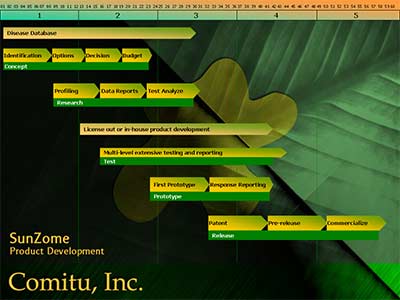
Thinking about whipping up a product development timeline in PowerPoint? Let’s break it down for you. But first, what is a product development timeline anyway? You can see a sample timeline created using PowerPoint.
To learn more, choose your version of PowerPoint. If we do not have a tutorial for your version of PowerPoint, explore the version closest to the one you use.
Product Development Timeline in PowerPoint 365
Product Development Timeline in PowerPoint
Tutorial Code: 19 04 02
Previous: 19 04 01 Add Glossy Highlights for Shapes
Next: 19 04 03 Text with Bites
Filed Under:
C
Tagged as: 19-04, Cool Shape Ideas, PowerPoint Cool Stuff, PowerPoint Tutorials
Comments Off on Cool Shape Ideas: Product Development Timeline
Microsoft and the Office logo are trademarks or registered trademarks of Microsoft Corporation in the United States and/or other countries.