
This is the print version of this page. All content is copyright Indezine.com 2000-2026.
Definitions and resources for terms and techniques used in the world of presentations
See Also:
PowerPoint and Presenting Notes
PowerPoint and Presenting Glossary
Presentations Glossary in alphabetical order:
A |
B |
C |
D |
E |
F |
G |
H |
I |
J |
K |
L |
M |
N |
O |
P |
Q |
R |
S |
T |
U |
V |
W |
X |
Y |
Z
Jim Harvey is a presentation skills coach and blogger. He’s been a professional speaker for more years than he’d like to remember — and he can help you to craft more successful memorable speeches, pitches, and presentations. Find out about his Fit, Focus and Flair model.
Here’s a list of links on Indezine.com where he has been featured:
 Presentation Summit 2016: Conversation with Jim Harvey
September 21, 2016
 Do You Need a Corporate PowerPoint Template?
December 12, 2012
Filed Under:
J
Tagged as: Jim Harvey, Personality
Comments Off on Jim Harvey
Theme Fonts are font choices that are part of a Theme in PowerPoint or other Microsoft Office programs. Each Theme Font set has two font choices, one for the Heading fonts and another for the Body fonts.
Filed Under:
T
Tagged as: 04-03, create theme fonts, PowerPoint Tutorials, Theme Fonts, Themes Templates Masters and Layouts
Comments Off on Theme Fonts: Create Custom Theme Fonts in PowerPoint
In PowerPoint, any Theme brings to the table several unique facts such as Theme Fonts, Theme Colors, and Theme Effects, and also Slide Layouts, Backgrounds, etc. When you apply another Theme to your PowerPoint presentation, the changes reflect in all slides in the presentation. Yet, the change is complete, and thus the resulting slides all look consistent.
Filed Under:
T
Tagged as: 04-03, PowerPoint Tutorials, Theme Fonts, Themes Templates Masters and Layouts
Comments Off on Theme Fonts: Theme Fonts in PowerPoint

Born in England, Nigel Holmes studied illustration at the Royal College of Art in London and then freelanced for magazines and newspapers for 12 years in London before going to New York in 1977 to work for Time Magazine. He became graphics director and stayed there for 16 years. He has written eight books on aspects of information design. With his son Rowland, Holmes makes short animated films. Clients have included the TED conference, Fortune Magazine conferences, Good Magazine and the National Geographic Society.
Here’s a list of links on Indezine.com where he has been featured:
 Presentation Summit 2021: Conversation with Nigel Holmes
July 28, 2021
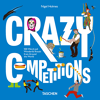 Crazy Competitions: Conversation with Nigel Holmes
November 28, 2018
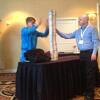 Nigel Holmes at the Presentation Summit 2015
September 30, 2015
 Presentation Summit 2015: Conversation with Nigel Holmes
September 3, 2015
 Nigel Holmes at the Presentation Summit 2011
September 20, 2011
Filed Under:
N
Tagged as: Designer, Illustrator, Nigel Holmes, Personality, Speaker
Comments Off on Nigel Holmes
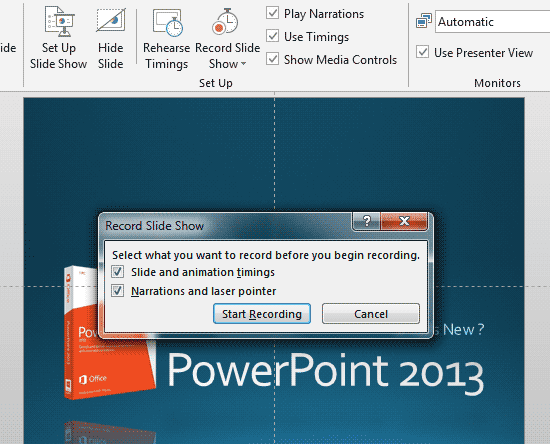
Unlike rehearsing slides, recording a slide show is not something that’s a practice session. Rather, recording slides is almost like delivering a presentation that you cannot deliver in person! Does that sound confusing? Let’s imagine that you cannot deliver your slides in person. You then want to do the next best option, that is to deliver your presentation in front of your computer, almost as if you had a live audience present. All this while, all your narrations are being recorded. Even the time you spend on each slide is recorded along with the time taken for each animation to play.
To learn more, choose your version of PowerPoint. If we do not have a tutorial for your version of PowerPoint, explore the version closest to the one you use.
Record Slide Show in PowerPoint 2013
Record Slide Show in PowerPoint 2010
Record Slide Show in PowerPoint 2011
Tutorial Code: 16 08 02
Previous: 16 08 01 Rehearse Slide Timings in PowerPoint
Next: 16 08 03 Kiosk Mode and Kiosk Assistant
Filed Under:
S
Tagged as: 16-08, PowerPoint Tutorials, Share and Prepare, Slide Show
Comments Off on Slide Show: Record Slide Show in PowerPoint
Microsoft and the Office logo are trademarks or registered trademarks of Microsoft Corporation in the United States and/or other countries.
