
This is the print version of this page. All content is copyright Indezine.com 2000-2026.
Definitions and resources for terms and techniques used in the world of presentations
See Also:
PowerPoint and Presenting Notes
PowerPoint and Presenting Glossary
Presentations Glossary in alphabetical order:
A |
B |
C |
D |
E |
F |
G |
H |
I |
J |
K |
L |
M |
N |
O |
P |
Q |
R |
S |
T |
U |
V |
W |
X |
Y |
Z
The first tab within the Media Browser in PowerPoint is the Photos tab. This tab provides you quick access to visual content within your iPhoto and Photo Booth collections. The Photos tab is divided into two panes, the top pane is a scroll-equipped area which enables you to navigate your album and the lower pane displays previews of your photos.
Filed Under:
I
Tagged as: 01-05, Interface - Overview, Interface and Basics, PowerPoint Tutorials
Comments Off on Interface Overview: Media Browser – Photos Tab in PowerPoint
There are two floating palettes available in PowerPoint for Mac, the Toolbox and the Media Browser. The Media Browser is a central repository of all sorts of media content that you can insert in your slides.
Filed Under:
I
Tagged as: Interface - Overview, Interface and Basics, PowerPoint Tutorials
Comments Off on Interface Overview: Media Browser in PowerPoint
Although almost everything within the Toolbox in PowerPoint 2011 works so well, you can still customize it as you want by clicking the Customize Toolbox button located at the upper-right corner of the Toolbox.
Filed Under:
I
Tagged as: Interface - Overview, Interface and Basics, PowerPoint Tutorials
Comments Off on Interface Overview: Customizing the Toolbox in PowerPoint
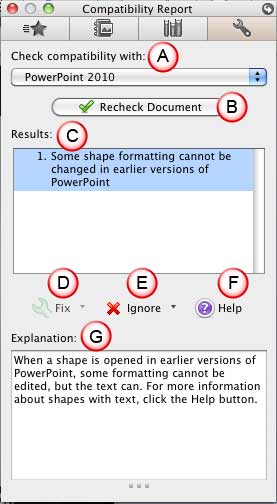
The Compatibility Report tab is the last tab within the Toolbox in PowerPoint. This tab helps you if the presentations you create in PowerPoint need to be shared with others who are using other versions of PowerPoint, on either the Mac or even on Microsoft Windows. Within this tab, you can check compatibility of any open presentation with other versions of PowerPoint.
To learn more, choose your version of PowerPoint. If we do not have a tutorial for your version of PowerPoint, explore the version closest to the one you use.
Toolbox – Compatibility Report Tab in PowerPoint 2011
Tutorial Code: 01 05 24
Previous: 01 05 23 Toolbox – Reference Tools Tab in PowerPoint
Next: 01 05 25 Customizing the Toolbox in PowerPoint
Filed Under:
I
Tagged as: Interface - Overview, Interface and Basics, PowerPoint Tutorials
Comments Off on Interface Overview: Toolbox – Compatibility Report Tab in PowerPoint
Reference Tools is the third tab in the Toolbox. This area provides quick access reference resources such as the thesaurus, dictionary, language translations, and web searches. Some of these options require that you are connected online.
To learn more, choose your version of PowerPoint. If we do not have a tutorial for your version of PowerPoint, explore the version closest to the one you use.
Toolbox – Reference Tools Tab in PowerPoint 2011

Tutorial Code: 01 05 23
Previous: 01 05 22 Toolbox – Scrapbook Tab in PowerPoint
Next: 01 05 24 Toolbox – Compatibility Report Tab in PowerPoint
Filed Under:
I
Tagged as: Interface - Overview, Interface and Basics, PowerPoint Tutorials
Comments Off on Interface Overview: Toolbox – Reference Tools Tab in PowerPoint
Microsoft and the Office logo are trademarks or registered trademarks of Microsoft Corporation in the United States and/or other countries.