
This is the print version of this page. All content is copyright Indezine.com 2000-2026.
Definitions and resources for terms and techniques used in the world of presentations
See Also:
PowerPoint and Presenting Notes
PowerPoint and Presenting Glossary
Presentations Glossary in alphabetical order:
A |
B |
C |
D |
E |
F |
G |
H |
I |
J |
K |
L |
M |
N |
O |
P |
Q |
R |
S |
T |
U |
V |
W |
X |
Y |
Z
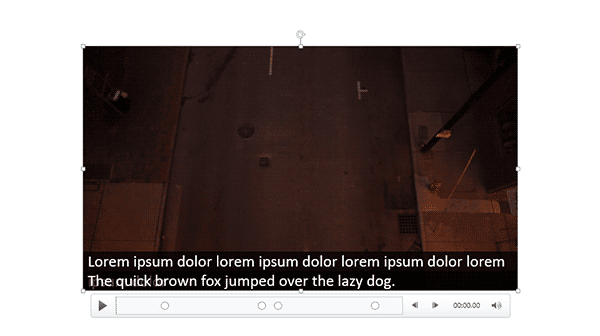
The STAMP add-in for PowerPoint is a free download from Microsoft that lets you add captions to media such as movie clips inserted in your slides. When installed, the STAMP add-in creates new buttons in the Video Tools Playback tab of the Ribbon in PowerPoint, within the Captions group of the Video Tools Playback tab, There are several options in this group that can be helpful while working with your existing captions.
To learn more, choose your version of PowerPoint. If we do not have a tutorial for your version of PowerPoint, explore the version closest to the one you use.
Caption Options – STAMP Add-in in PowerPoint 2016, 2013, and 2010
Tutorial Code: 18 03 07
Previous: 18 03 06 Edit Captions – STAMP Add-in in PowerPoint
Next: 19 01 01 PowerPoint Designer in PowerPoint
Filed Under:
S
Tagged as: 18-03, Accessibility, PowerPoint Tutorials, STAMP
Comments Off on STAMP: Caption Options – STAMP Add-in in PowerPoint
We have already explored how you can create new captions for movies inserted in PowerPoint, using the STAMP Caption Editor. Once these captions have been added, you may want to edit them, or add new captions.
To learn more, choose your version of PowerPoint. If we do not have a tutorial for your version of PowerPoint, explore the version closest to the one you use.
Edit Captions – STAMP Add-in in PowerPoint 2016, 2013, and 2010

Tutorial Code: 18 03 06
Previous: 18 03 05 Import TTML Captions with STAMP in PowerPoint
Next: 18 03 07 Caption Options – STAMP Add-in in PowerPoint
Filed Under:
S
Tagged as: 18-03, Accessibility, PowerPoint Tutorials, STAMP
Comments Off on STAMP: Edit Captions – STAMP Add-in in PowerPoint
Need to add arrows to your slide? No problem! Whether you’re labeling stuff or just pointing out the obvious, arrows have got your back. And guess what? PowerPoint makes adding arrows as easy as pie with a few quick keyboard shortcuts. It’s fast, it’s simple, and it’s perfect for slide designers who are always on the go. So go ahead, point things out like a pro!
To learn more, choose your version of PowerPoint. If we do not have a tutorial for your version of PowerPoint, explore the version closest to the one you use.
Insert Arrow Symbols in PowerPoint 365

Tutorial Code: 05 05 08
Previous: 05 05 07 Insert a Nonbreaking Space in PowerPoint
Next: 05 05 09 Insert Equations in PowerPoint
Filed Under:
S
Tagged as: 05-05, PowerPoint Tutorials, Symbols, Text and Fonts
Comments Off on Symbols: Insert Arrow Symbols in PowerPoint
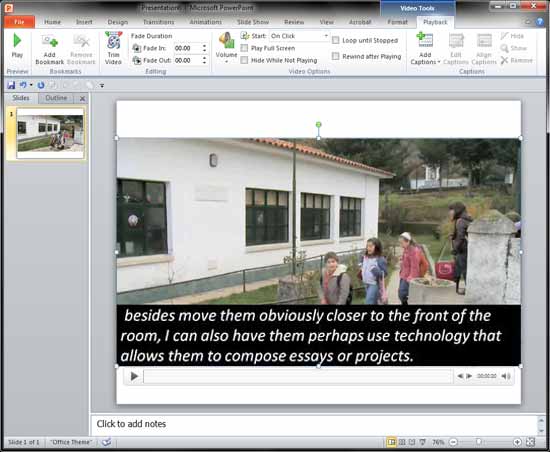
It’s so easy to create and insert captions using the Caption Editor within the STAMP add-in for PowerPoint. But if your captions are already available as TTML files, you can import those captions into PowerPoint even more easily.
To learn more, choose your version of PowerPoint. If we do not have a tutorial for your version of PowerPoint, explore the version closest to the one you use.
Import TTML Captions with STAMP in PowerPoint 2016, 2013, and 2010
Tutorial Code: 18 03 05
Previous: 18 03 04 TTML XML Files for the STAMP Add-in in PowerPoint
Next: 18 03 06 Edit Captions – STAMP Add-in in PowerPoint
Filed Under:
S
Tagged as: 18-03, Accessibility, PowerPoint Tutorials, STAMP
Comments Off on STAMP: Import TTML Captions with STAMP in PowerPoint
We already showed how you can use the STAMP add-in for PowerPoint to manually add captions for videos right inside PowerPoint. While manually adding captions is a great way to get easily started, professional organizations use TTML files. TTML files are markup files, not too different in structure from HTML web pages, and typically they have the XML file extension.
To learn more, choose your version of PowerPoint. If we do not have a tutorial for your version of PowerPoint, explore the version closest to the one you use.
TTML XML Files for the STAMP Add-in in PowerPoint 2016, 2013, and 2010

Tutorial Code: 18 03 04
Previous: 18 03 03 Video Captions using STAMP in PowerPoint
Next: 18 03 05 Import TTML Captions with STAMP in PowerPoint
Filed Under:
S
Tagged as: 18-03, Accessibility, PowerPoint Tutorials, STAMP
Comments Off on STAMP: TTML XML Files for the STAMP Add-in in PowerPoint
Microsoft and the Office logo are trademarks or registered trademarks of Microsoft Corporation in the United States and/or other countries.