
This is the print version of this page. All content is copyright Indezine.com 2000-2026.
Definitions and resources for terms and techniques used in the world of presentations
See Also:
PowerPoint and Presenting Notes
PowerPoint and Presenting Glossary
Presentations Glossary in alphabetical order:
A |
B |
C |
D |
E |
F |
G |
H |
I |
J |
K |
L |
M |
N |
O |
P |
Q |
R |
S |
T |
U |
V |
W |
X |
Y |
Z
Microsoft 365 is Microsoft’s cloud-based subscription offering that lets you run always upgraded and updated Office applications on the desktop, on tablets and smartphones—and also online. This Microsoft 365 product differs from the perpetual versions of Office, and you can find out more in our Microsoft 365 or or Office 2021 article.
To learn more, choose your version of PowerPoint. If we do not have a tutorial for your version of PowerPoint, explore the version closest to the one you use.

Tutorial Code: 01 02 03
Previous: 01 02 02 Microsoft 365 or Office 2021?
Next: 01 02 04 Running Microsoft Office for the First Time
Filed Under:
B
Tagged as: 01-02, Buying and Installing PowerPoint, Interface and Basics, PowerPoint Tutorials
Comments Off on Buying and Installing PowerPoint: Microsoft 365 Subscriptions
We all realize that nothing is really free in today’s world, yet we all look for free stuff all the time. Well, maybe we were partially wrong when we said “nothing is free”, because you can get a free, or at least a cheaper copy of PowerPoint and Microsoft Office. When we say free or cheap, we do not refer to bootlegged copies, but genuine, original software. Here are some options for you to get a free or cheaper copy of PowerPoint.

Tutorial Code: 01 02 01
Previous: 01 01 02 Slide Dimensions in PowerPoint – Size Differences
Next: 01 02 02 Office 365 or Office 2021?
Filed Under:
B
Tagged as: 01-02, Buying and Installing PowerPoint, Interface and Basics, PowerPoint Tutorials
Comments Off on Buying and Installing PowerPoint: Microsoft Office for Free?
PowerPoint enables you to use its repertoire of shapes to create some amazing artwork. Further, the Merge Shape commands allow you to create complex shapes by merging several simple shapes. Additionally, these options also let you convert your text to shapes so that you can see the text even on a computer that does not have a particular font installed.
To learn more, choose your version of PowerPoint. If we do not have a tutorial for your version of PowerPoint, explore the version closest to the one you use.
Convert Text to Shapes by Fragmentation in PowerPoint 2016
Convert Text to Shapes by Fragmentation in PowerPoint 2013
Convert Text to Shapes by Fragmentation in PowerPoint 2016

Tutorial Code: 06 10 09
Previous: 06 10 08 Convert Text to Shapes by Intersection in PowerPoint
Next: 06 10 10 Merge Shapes with Pictures in PowerPoint
Filed Under:
M
Tagged as: 06-10, Merge Shapes, PowerPoint Tutorials, Shapes
Comments Off on Merge Shapes: Convert Text to Shapes by Fragmentation in PowerPoint
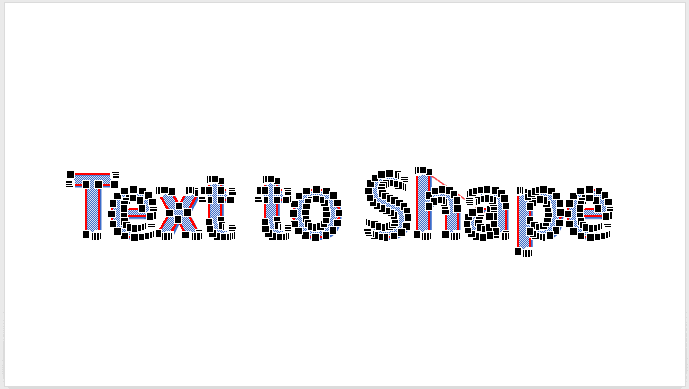
PowerPoint has several features that may amaze you, but did you know about an option to convert regular text into a shape. First of all, this is an undocumented feature. And then, this is such an utterly useful option, that people find all sorts of excuses to use this feature. For example, you can now easily create logos in PowerPoint without using any other application. Or use a fancy font and then share that presentation with others in the knowledge that recipients can see the font exactly as intended, even if it’s not installed on their computers.
To learn more, choose your version of PowerPoint. If we do not have a tutorial for your version of PowerPoint, explore the version closest to the one you use.
Convert Text to Shape by Intersection in PowerPoint 2016
Convert Text to Shape by Intersection in PowerPoint 2013
Convert Text to Shape by Intersection in PowerPoint 2016
Tutorial Code: 06 10 08
Previous: 06 10 07 Shape Subtract Command in PowerPoint
Next: 06 10 09 Convert Text to Shapes by Fragmentation in PowerPoint
Filed Under:
M
Tagged as: 06-10, Merge Shapes, PowerPoint Tutorials, Shapes
Comments Off on Merge Shapes: Convert Text to Shapes by Intersection in PowerPoint
Sometimes you want your Text Box to be placed in an exact position on your slide. Yes, you can select a Text Box and move it around by dragging it with your mouse, and then let it go wherever you want it placed. However, for all practical reasons this process is just visual and not accurate enough. Thankfully, PowerPoint provides a way to accurately position any Text Box just where you want it located.
Filed Under:
T
Tagged as: 05-06, PowerPoint Tutorials, Text and Fonts, Text Formatting
Comments Off on Text Formatting: Move or Reposition Text Boxes Accurately on a Slide in PowerPoint
Microsoft and the Office logo are trademarks or registered trademarks of Microsoft Corporation in the United States and/or other countries.