
This is the print version of this page. All content is copyright Indezine.com 2000-2026.
Definitions and resources for terms and techniques used in the world of presentations
See Also:
PowerPoint and Presenting Notes
PowerPoint and Presenting Glossary
Presentations Glossary in alphabetical order:
A |
B |
C |
D |
E |
F |
G |
H |
I |
J |
K |
L |
M |
N |
O |
P |
Q |
R |
S |
T |
U |
V |
W |
X |
Y |
Z

Tsufit is a former lawyer who has been described by the Toronto Star as “a starburst of energy― bright bubbly and upbeat” and by Publisher’s Weekly as a “coaching dynamo”. Her book, Step Into the Spotlight! has been endorsed by Tom Peters, Jay Conrad Levinson, Jack Trout, BNI founder, Ivan Misner, Les Brown, Al Ries, and many other New York Times best-selling authors and experts.
Filed Under:
T
Tagged as: Personality, Tsufit
Comments Off on Tsufit
PowerPoint allows you to print Notes pages. These contain the notes that you may have saved within the Notes pane for all your individual slides. Unless you modify the Notes Master, your printed Notes pages may look basic. The Notes Master is one of the four Masters within PowerPoint. This Master enables you to modify the appearance of your Notes pages, especially how they will look when you print them.
Filed Under:
S
Tagged as: 04-07, PowerPoint Tutorials, Slide Master and Slide Layouts, Themes Templates Masters and Layouts
Comments Off on Slide Master and Slide Layouts: Notes Master in PowerPoint
Handouts are presentation accompaniments that are almost always intended for print. It is a good idea to distribute handouts before your PowerPoint presentation’s delivery so that the audience can follow along the presentation. If you don’t do so, you may certainly want to carry handouts with you to distribute as takeaways for your audience. You can control the look of your handouts by formatting the Handout Master. This can be useful if you want to include a graphic such as a logo on each page of your handout.
Filed Under:
S
Tagged as: 04-07, PowerPoint Tutorials, Slide Master and Slide Layouts, Themes Templates Masters and Layouts
Comments Off on Slide Master and Slide Layouts: Handout Master in PowerPoint

Sandra Schrift is president/owner of CoachSchrift and Associates, a San Diego based consulting, training and coaching firm. Since 1996, Sandra has been coaching speakers who want to become highly paid professional speakers as well as executives and business professionals who want to develop persuasive presentations.
Filed Under:
S
Tagged as: Personality, Sandra Schrift
Comments Off on Sandra Schrift
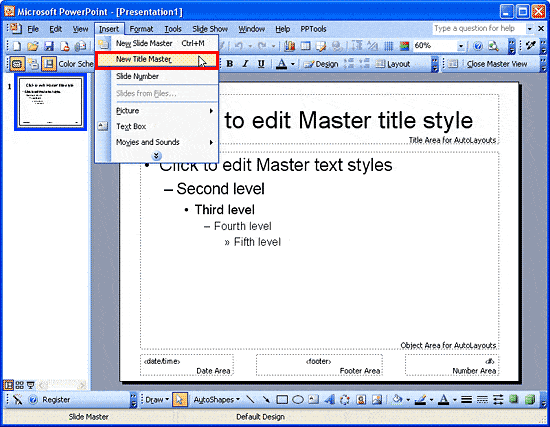
When PowerPoint is launched, or when you create a new presentation, you typically see the first slide of the presentation. This slide is known as the Title slide. It contains placeholders for the slide title and the slide subtitle. Note that this layout is different from other slides which typically have a title placeholder with another placeholder for bulleted text (or a chart, graphic, etc.). All these other slides are influenced by the Slide Master, which governs their appearance and layout. The appearance and look of the Title Slide is influenced by the Title Master. This is a separate Master that is a subset of the Slide Master.
To learn more, choose your version of PowerPoint. If we do not have a tutorial for your version of PowerPoint, explore the version closest to the one you use.
Title Master in PowerPoint 2003
Tutorial Code: 04 07 03
Previous: 04 07 02 Slide Master
Next: 04 07 04 Handout Master
Filed Under:
S
Tagged as: 04-07, PowerPoint Tutorials, Slide Master and Slide Layouts, Themes Templates Masters and Layouts
Comments Off on Slide Master and Slide Layouts: Title Master in PowerPoint
Microsoft and the Office logo are trademarks or registered trademarks of Microsoft Corporation in the United States and/or other countries.