
This is the print version of this page. All content is copyright Indezine.com 2000-2026.
Definitions and resources for terms and techniques used in the world of presentations
See Also:
PowerPoint and Presenting Notes
PowerPoint and Presenting Glossary
Presentations Glossary in alphabetical order:
A |
B |
C |
D |
E |
F |
G |
H |
I |
J |
K |
L |
M |
N |
O |
P |
Q |
R |
S |
T |
U |
V |
W |
X |
Y |
Z
While PowerPoint allows you to create tables in various ways, from inserting them with a pre-decided number of rows and columns to something as intuitive as actually drawing your own table, most of the tables you create using either of these two methods will show borders between individual cells. These borders are great and they make the segregation between cells obvious. Yet, what if you don’t want to see the border altogether? Let us first understand that not seeing the border is not the same as getting rid of the border altogether, the latter happens when you merge cells, or even when you erase some borders. However, what if you just want to cosmetically hinder the visibility of the border, as in a border that exists but is not visible. The Border options allow you to make some of table borders visible/invisible for the entire table, or for a bunch of contagious table cells that are selected.
To learn more, choose your version of PowerPoint. If we do not have a tutorial for your version of PowerPoint, explore the version closest to the one you use.
Toggle Visibility of Table Borders in PowerPoint 2013
Toggle Visibility of Table Borders in PowerPoint 2011

Filed Under:
T
Tagged as: 12-04, PowerPoint Tutorials, Table Borders, Tables
Comments Off on Table Borders: Toggle Visibility of Table Borders
You can manually draw tables and divide your tables into numerous rows, columns, and cells. In the same way, PowerPoint allows you to erase segregations (borders) between cells and thus merge cells.
To learn more, choose your version of PowerPoint. If we do not have a tutorial for your version of PowerPoint, explore the version closest to the one you use.
Erase Table Borders in PowerPoint 2013
Erase Table Borders in PowerPoint 2011

Filed Under:
T
Tagged as: 12-04, PowerPoint Tutorials, Table Borders, Tables
Comments Off on Table Borders: Erase Table Borders
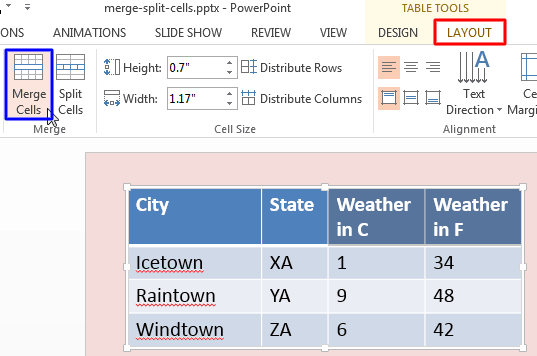
Add a table to your PowerPoint slide and then populate the table with content and then what comes next? Probably you need to add or remove rows and columns. That’s the case with most people who work with tables. But very few people realize that the table cells can be made larger or smaller without influencing the entire row or column and that’s something that can be easily achieved by merging or splitting cells in your existing table. This is essentially true for tables that have two header rows, or even with tables that have a long phrase in the header row.
To learn more, choose your version of PowerPoint. If we do not have a tutorial for your version of PowerPoint, explore the version closest to the one you use.
Merge and Split Table Cells in PowerPoint 2013
Merge and Split Table Cells in PowerPoint 2011
Filed Under:
T
Tagged as: 12-03, PowerPoint Tutorials, Table Cells, Tables
Comments Off on Table Cells: Merge and Split Table Cells
Create a new table in PowerPoint and you’ll find that it already includes some sort of default formatting. More often than not, you’ll find that the table already has banded rows and the header row highlighted. While PowerPoint decides to turn on some of these Table Options, there are some that you must manually enable. All put together, you can play with 6 distinct options that let you control the way through which table elements can be made to stand apart.
To learn more, choose your version of PowerPoint. If we do not have a tutorial for your version of PowerPoint, explore the version closest to the one you use.
Table Style Options in PowerPoint 2013
Table Options in PowerPoint 2011

Filed Under:
T
Tagged as: 12-03, PowerPoint Tutorials, Table Cells, Tables
Comments Off on Table Cells: Table Style Options
An individual cell within a table acts just like any other text box as far as its content or even appearance is concerned. Therefore, all text alignment options used for text containers work with table cells too with a few exceptions.
To learn more, choose your version of PowerPoint. If we do not have a tutorial for your version of PowerPoint, explore the version closest to the one you use.
Text Alignment within Table Cells in PowerPoint 2013
Text Alignment within Table Cells in PowerPoint 2011

Filed Under:
T
Tagged as: 12-03, PowerPoint Tutorials, Table Cells, Tables
Comments Off on Table Cells: Text Alignment within Table Cells
Microsoft and the Office logo are trademarks or registered trademarks of Microsoft Corporation in the United States and/or other countries.